You Like My Tutorials? Click The Banner To Keep 'Em Coming!
 |
|
|

| ||
|
||
|
Main MenuLatest NewsArchived NewsTutorialsLinksE-Mail Me Other |
Archived News | |
|
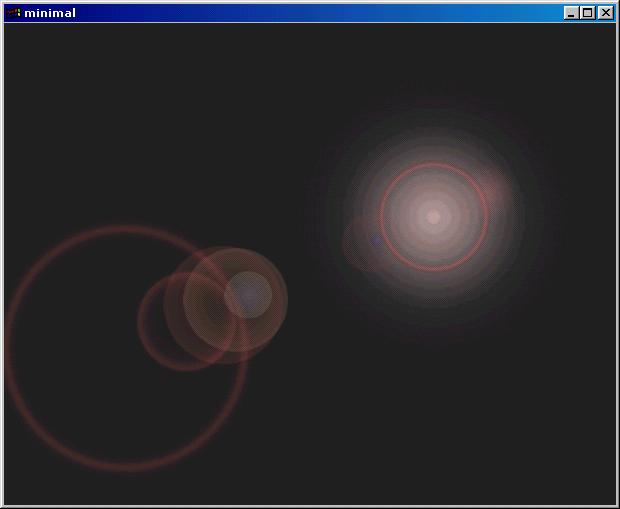
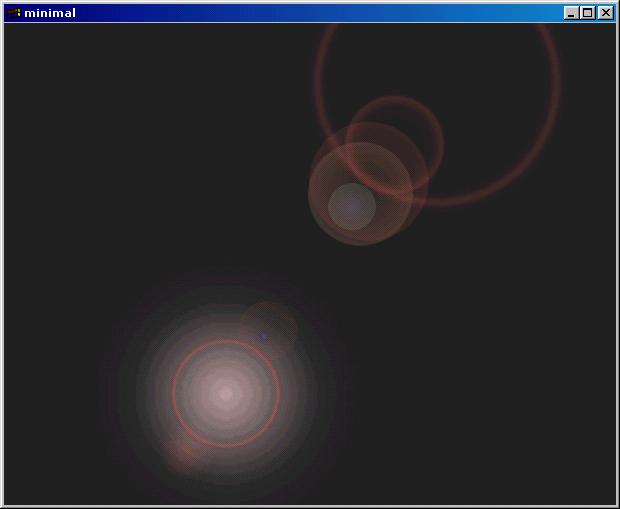
November 18, 1999 -- Three New Tutorials!First is the Drawing Primitives tutorial. This one's about drawing stuff in 3d and working with colors in OpenGL. Then there's a small tutorial on working with constants. And finally, my much anticipated texturing tutorial is online. If you're new to the site, check out the other tutorials on getting started with OpenGL. Click here to open the Tutorials Index. November 15, 1999 -- What I've Been Up ToThere are two updates today, so be sure to read the next one also. That one was supposed to be yesterday's, but I forgot about it. I've been hacking around with my Quake 2-style Console, and have started to get somewhere with it. I plan on having callbacks that'll give you information on what commands are sent to the console, and you can handle them in your program. This way when someone changes a variable, you can find out that it was changed and react accordingly. Once I get it all coded I'll make it nice and neat so it's easier to understand. So far I've almost got to where you can bind a key to a "function" in the game (like shooting, moving, etc.), and check if that function has been called when the bound key was pressed. Anyways I should get around to finishing up my tutorial on texture mapping. If you're getting started with OpenGL I suggest you check out the tutorials at NeHe Productions!. The ones he's got so far go into details on 3d primitives, coloring, texture mapping, and all sorts of stuff you might not understand if you're new to 3d graphics. I wanna get some more advanced tutorials on this site (since there are plenty of people who do know basics of OpenGL) before getting full beginner tutorials. I've got my texturing code set up so that you make a constant integer for each texture (ex. TEX_MARBLE, TEX_SMOKE, that sort of thing). Then you say 'TEX_MARBLE = LoadTexture("marble1.bmp")' to load it. Then while in the game, you can call 'glBindTexture(GL_TEXTURE_2D, TEX_MARBLE);' and the current texture is active. No worrying about remembering texture numbers or anything. Plus you can call ToggleBilinear() or ToggleMipMap() (which are obvious as to what they do) and then call ReSetupTextures() to set all textures in memory to those new settings. It's good to have for people with no hardware acceleration. And I got my console to be able to toggle Bilinear Filtering and MipMapping too! I am having too much fun with this. =] November 15, 1999 -- Yet another fix to Basic OGL TutorialYeesh. Started this update yesterday and it's been over a day before I finally get it up. Ah well, on to the update. First, glaux.lib and glaux.h are useless. You don't need them. Second, I added two lines to "main.h" which get rid of warning messages which are unnecessary. // disable useless conversion warnings #pragma warning (disable:4244) #pragma warning (disable:4305) Third, because I found out about disabling the warnings i just mentioned, add this line to the Init() function of "main.cpp" just after the line "glBlendFunc(GL_SRC_ALPHA, GL_ONE_MINUS_SRC_ALPHA);": glAlphaFunc(GL_GEQUAL, 0.05); November 14, 1999 -- Basic OpenGL Tutorial Fixed AgainI must have fixed it while at school but never uploaded it, so I assumed when I uploaded it from home it was fixed. Anyways, if you got an error saying that the variables "ww" and "wh" were undefined, place this line just after the #include "main.h" line: int ww, wh; Also, I was told that the WNDCLASS should be given the style of CS_OWNDC. That's also been updated in the tutorial. To fix this, change the line that says "wc.style = 0;" to "wc.style = CS_OWNDC;". Anyways, I've been fiddling around with the gluProject() function, which someone pointed out to me recently. It may turn out to be a better alternative to glFeedbackBuffer. Not sure though, because it needs to retrieve 2 large arrays of variables from OpenGL, which if done each and every frame might cause a 0.00001% slowdown. It is however a much easier to use alternative. Instead of rendering a point like with glFeedback, it takes a 3-d coordinate (x, y, and z) and uses the world and perspective matrices to see if it's on screen. Plus it works even if the object isn't on screen, so you can see how far off screen it actually is. Camera flares are one thing I've never been able to get the hang of until yesterday. While messing around with gluProject, I managed to come up with a sweet lense flare. Check these screen shots out:
Cool, huh? Yeah, I know, the colors of the "sun" are very far off (and pretty ugly too), but I'll bet you can't wait till I put that one in a tutorial. =] As ugly as it is, it looks awesome in real time. Plus I made up a small function that lets you input values like what texture to use, what colors to use, where to position each circle, and how big to make them. November 12, 1999 -- Toon3DJust got an email about something called Toon3D. Here's what it said: Toon3DCreator and Toon3DPlayer November 12, 1999 -- A Couple of CorrectionsThere's a few things that were pointed out to me recently and I've taken the time to fix them. First is the Basic OpenGL Tutorial. The source code has been fixed with properly defined window width and window height variables. Sorry for any problems this may have caused. Also, someone found out the reason why it wasn't clearing the screen to black like it should have. This was because it was missing the glClear command in the Display() function. The line you need is: glClear(GL_COLOR_BUFFER_BIT | GL_DEPTH_BUFFER_BIT); Thanks to those who helped fix these problems, you know who you are. =] Second, I was told that the Academic version of C++ does have one limitation. You have no access to optimization options, all your programs run as if they were debug compiled. Thanks to AwEn for this input. As for now I'm working on the Bitmapped Text Output tutorial. This one seems to be one of the most often requested ones. That and I can't possibly do the Q2 console or the GUI system without it. =] November 11, 1999 -- GuestbookJust a quick post to say that I added a guestbook to the site. Click the link on the left to view it and sign it. Sign it! Now! =]November 11, 1999 -- New Tutorial!All done with the Triangle tutorial! Check it out and let me know how you like it. Next up will be the Colors tutorial and I'll also start working on all the other cool tutorials I've promised. I'll be getting Burst! Media advertising real soon. I know you all can't wait for that. =] I've also broken 500 hits. And to think I've been online for one full day as of this minute. The fact that I started working on this site less than a *week* ago just boggles the mind. Boggles my mind anyway. =D November 11, 1999 -- Thanks!I've received a ton of positive feedback on the site so far. It hasn't been one full day and I'm already on the verge of 500 hits. Watching a counter go up sure is fun when you start a new site. =] I'm trying to write these tutorials as fast as possible, but with school in the way I'm sorry to say it may take some time. Darn school! Keep checking back though, as I'm almost done with the tutorial on drawing polygons. Anyways, keep sending in your suggestions and comments, they're always helpful and very appreciated. Send 'em to joezimmerman1@hotmail.com. November 10, 1999 -- First update ever!Welcome to the site! I've got a bunch of Tutorials on-line and I have big plans for more. Most of what's coming I've already taken the time to make, I just have to write an tutorial on how to use them. So you know I'm telling the truth when I give you this impressive list of what tutorials I'm planning. These are in order of when I plan on posting them.
For now all I have is what's online, but as you can see I've got a lot of code to give away and I'm not being stingy with it. =]
|
||