| What is CheckUrl ? |
CheckUrl is a powerful tool to verify Urls in a set of Html pages using Internet protocols. It can be used to verify your bookmarks locally for example but also to verify if all links on your site are working. Checkurl comes with a bunch of options parameters that allows you to customize your need.
CheckUrl generate a report in Html format. (Click here to see an example of report) This report is generated on the fly, that is, each time all links on one page have been verified, the application wakes up the report manager and tells him to print the results of the work. This way, when you are checking large site with thousands of URLs, you can have a look at the result of the processing while it is still working. It means you won't have to wait until it is entirely finished. It also means that if your computer crashes you still have the report that checkurl was building before the incident.
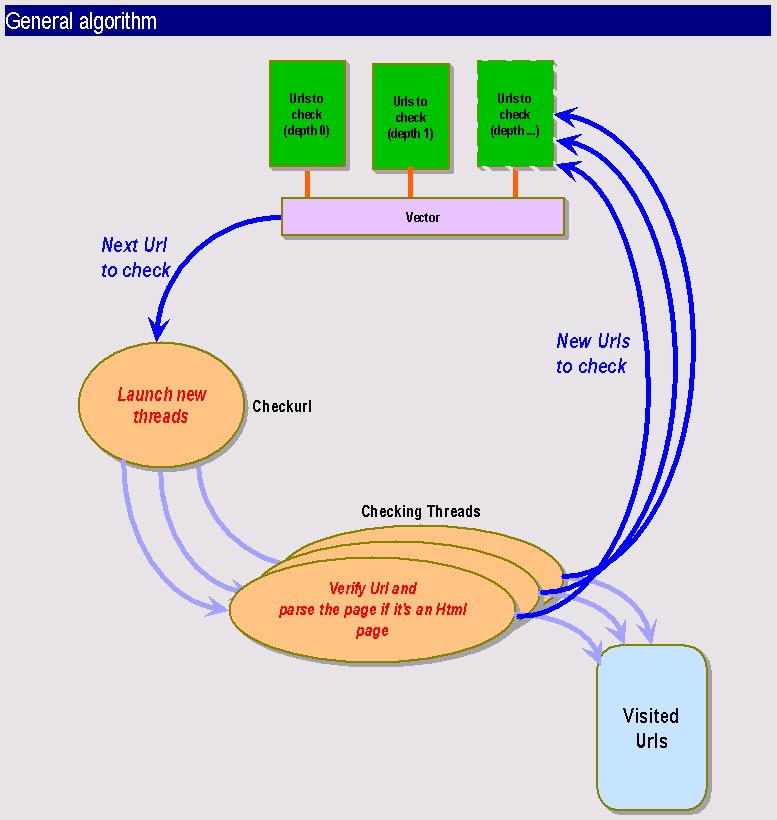
Checkurl is a multi-threaded Java program using the JDK 1.1.5. It has been tested on the Solaris and PC environment and it worked fine on both. You can specify the number of threads you want to work concurrently. A thread deals with one URL, it checks whether it is correct or not and then parse the page, if the type of the file allows it and finds all included urls. These will be sent right back into the UrlCheck engine depending on the recursion options.
Checkurl performance is quite
good, especially when using it with a high number of threads. It can easily
verify a few thousands URLs in half an hour. Of course this depends on
your connection and the server you are running it on. It also implies that
it is ressource- and time-consumming when throwing a high number of threads
on a very large site, in this case you may want to execute it during the
night and save the result in a report file that you will consult the next
day so that users will not suffer from the load of the server.
| What can Checkurl do for you ? |
CheckUrl knows how to handle http, ftp and file: connection. You need to run the program locally to check "file:" urls.
Checkurl can be used on the command line, or as a CGI behind a web server. It produces a report on the fly. The report can be saved into a file or display on the output channel. The error channel is used as a monitor allowing you to monitor checkurl activity. Use the debug option to monitor checkurl activity.
The report is an HTML file. It sorts information by URL. For one URL you will find all the included URLs sorted by their return code (200 if it is ok, 404 file not found, etc.). So it's easy to find which URLs are bad and correct them in all pages they are contained in. You can specify if you want to see only problematic URLs on the report, this will be appreciated by webmasters ! You will also see the time it took to connect to this page, if you activate the long report option. As there may be a lot of links on one single page we added a anchor link to the container URL so that it is easy to find back which container page you are actually seeing. When you click on a link on the report the selected URL will open up in a new window, so that you can go on consulting the report, while watching an URL.
Checkurl detects loops which is very useful especially with redirected urls.
Checkurl can check a specified domain or it can also go out of this domain, depending on the span option. This is a good example to understand how it works: if your are checking www.essi.fr and this page contains an URLs to www.inria.fr, checkurl will only test the www.inria.fr URL and will not go further in this direction. If you activate the --span option, it will not only check the www.inria.fr url but it will also parse this page and go on checking links that are contained on www.inria.fr. This will be very handy for ISP that wants to check linked web sites.
The same way, it can stay
in the subdirectories of the base url (the initial url that is passed by
argument to the application) or it can go up in the hierarchy and check
URLs in the parent directories.
| Options |
Here are listed checkurl options, see below for working examples:
Usage: java Checkurl [-n numberretry] [-vbdspl] [-t number] [--nofile] [--parent] [-r depth] [-o outputfile]  -f htmlfilename
Usage: java Checkurl [-n numberretry] [-vbdspl] [-t number] [--nofile] [--parent] [-r depth] [-o outputfile]  url
| -h (--help) | Online help |
| -f htmlfilename | Checkurl will test all urls in this HTML file. |
| url | The initial url to check (base url) |
| -b (--badonly) | Shows all urls that cause a problem |
| -d (--debug) | Debug mode, activate it to monitor checkurl activity |
| -l (--long) | Long format report, shows the connection time |
| -n XX | The number of retries (Not implemented) |
| --nofile | Does not write any report file |
| -o outputfile | Specify the name of the output file (by default report.html) |
| -p (--pipe) | Prints html report on standard output (for CGI use) and in the file if nofile is not activate |
| --parent | Allows checkurl to check URLs in parent directory hierarchy |
| -r | Recursivity depth. The base url is depth 0. All links contained in this page is depth 1 (by default this options is set to 0 that means it will only check the base url) |
| -s (--span) | Span mode allows checkurl to go outside the base url domain |
| -t | Specify the number of threads (by default it is set to 10) |
Examples:
At the command line type:
java Checkurl -d -r 1 -t 30 http://www.essi.frThis will verify links on the main page of ESSI, while monitoring the activity. It will check URLs with depth 0 (www.essi.fr) depth 1 (links on the www.essi.fr) pages
Beware: your classpath must
be correctly set to the jdk1.1.5 classes.zip file and to the checkurl directory.
At the command line type:
java Checkurl -d -s -r 1 -t 10 -f index.htmlThe current directory must then contains a file named index.html
You can use checkurl over the web. Following is a sample of the code to configure checkurl to work in a CGI script:
java Checkurl -r 0 --nofile URL
if $?=1
then URL OK
else URL not OK
| How it works |
| Known Bugs... |
Checkurl will crash if you specify a number of threads that is too high for the system on which it is running. Sometimes on Solaris environment the threads won't work at the beginning. Just restart Checkurl and it shoud be fine.
Checkurl will sometimes skip
some URLs. This bug will be fixed in next version as we intend to maintain
this software. This error is due to the multi-threading as it never happens
with one single thread. The frequency of unchecked URLs is proportionnal
to the number of threads. With less than 10 threads it almost never happens.
However as we manage to detext unckecked URLs, they are listed on the report
as "not verified URLs. This bug is hardly reproductible and it does not
happen to the same URLs all the time. We suspect that the problem comes
from a concurrent access to a shared ressource. This is the only "real"
bug known at this time, but for sure there may be more :-). Please send
us information if you find new ones with the maximum of information (especially
the URLs you were checking).
| Improvements |
Checkurl could be improved with an updated URLconnection class that would allow to set the timeout length.
Supported tag from whick to find URLs are <A HREF..> <IMG SRC...><FRAME SRC...> new tags could easily be added to checkurl. Even the <BASENAME...> tag should not be to much difficult to implement.
Checkurl could be used as a bookmark cleaner very easily: it could delete all bookmark entries that don't work.
Next version of Checkurl
will provide more statistical information on checked URLs. Checkurl could
eventually be used only to provide these. It would also be easy to use
Checkurl architecture to generate map of sites for examples.
| Sources |
You can download sources here. Note that Checkurl is protected by a GNU licence. You can also send money if you are using Checkurl and you desire to !
Checkurl uses an HTML Parser
that has been developed by Arthur Do from Stanford University. Thanks very
much to him for having sent us the package and the sources ! Of course
we are only providing the .class files of the HTML Parser that is needed
by Checkurl.
| Try it online ! |
You can try it online. Note that Checkurl is better working in command line. If you use it via your Web browser, you won't be able to check a large page (generally only depth 1 will work), that's because the HTTP server will
generate a timeout and kill the process.
If you want to try it you have to change the PATHS in the Checkurl.cgi file, and your HTTP server
must accept non-parsed Cgi scripts.
| Contact |
Checkurl has been developed by Patrice Bruhat and Alexandre Martin for a graduate degree Internet Project. Feel free to send us your feedback, improvement suggestions, ideas of new functionnalities that you feel necessary. If you think we did a good job and you would like to employ us, do not hesitate to contact us !